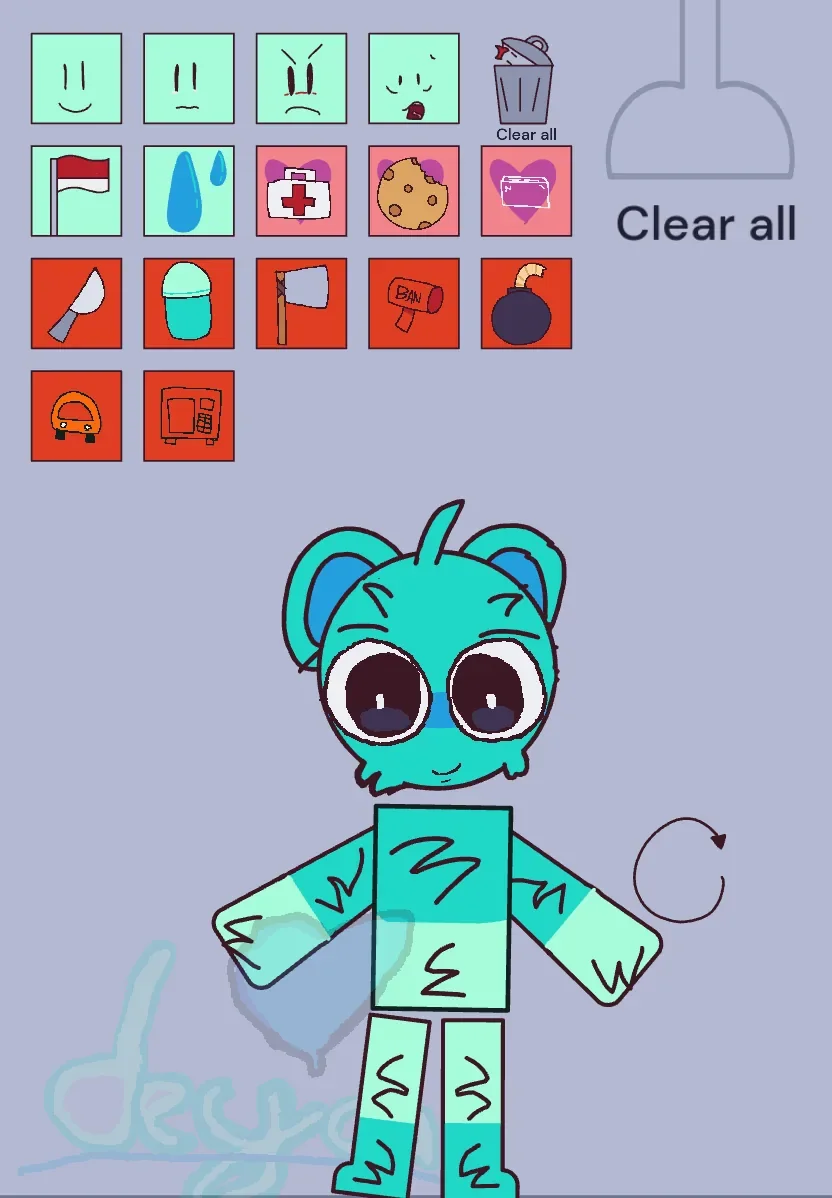
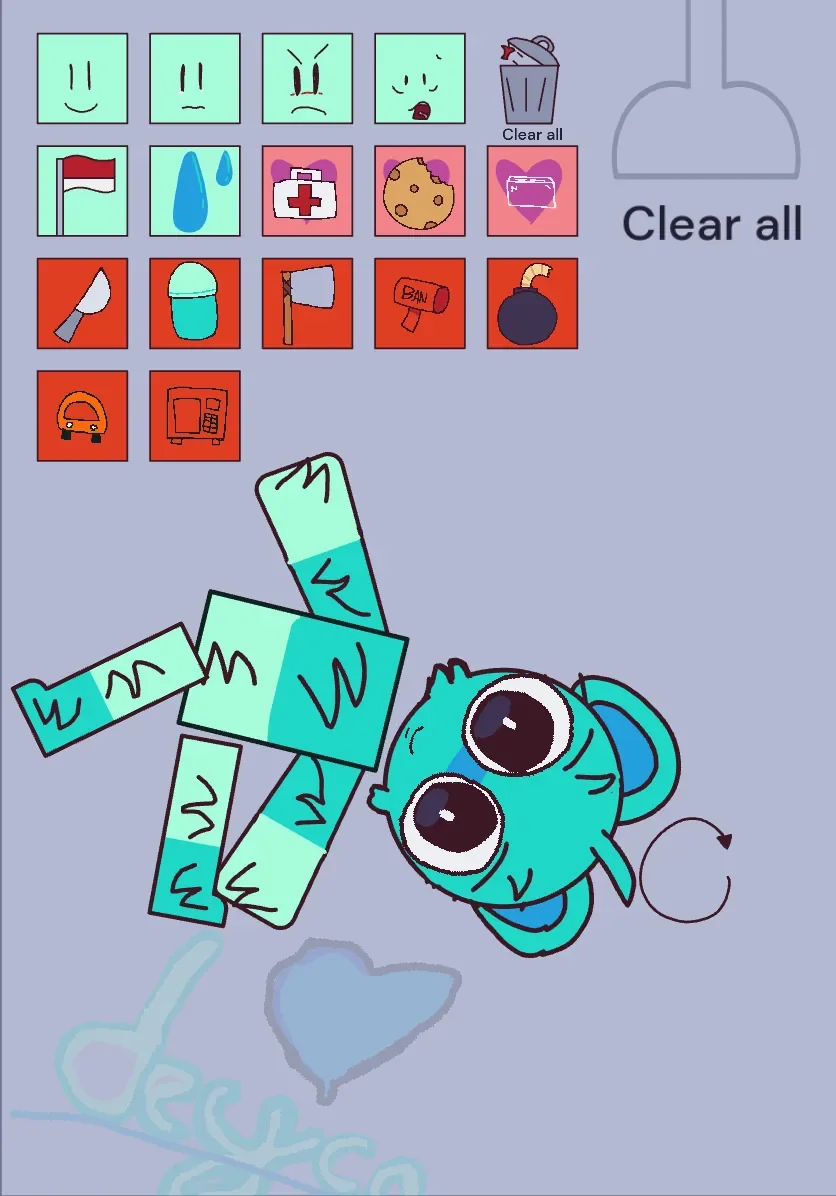
Pulling the head of a hand-drawn ragdoll sideways in Sprunki Kick the Buddy but with Sky instantly breaks the figure's upright stance, sending its paper-like torso and limbs folding under their own weight. Sky sits in the middle of a pale blue-gray room, rendered with rough marker-like outlines, an oversized pair of eyes, and a bright turquoise body with separated limbs. There are no rounds to survive, enemies to defeat, or high scores to accumulate. Instead, the simulation functions as an open physics toy where players manipulate Sky, spawn items from a small grid, and watch how different objects alter the character's posture and expressions.
Created by @Hamptershaa, this edition relies on physical unpredictability rather than structured challenges. When an arm or leg is dragged across the room, it collides with the floor or torso and settles into whatever position the physics calculation leaves behind. Sky does not snap back into a default standing animation, meaning a single swift drag can leave the ragdoll tangled in a heap at the bottom of the arena. Without health meters, failure states, or stage objectives, testing centers entirely on experimenting with momentum, object placement, and character reactions inside a compact space.
 3 Game Screenshots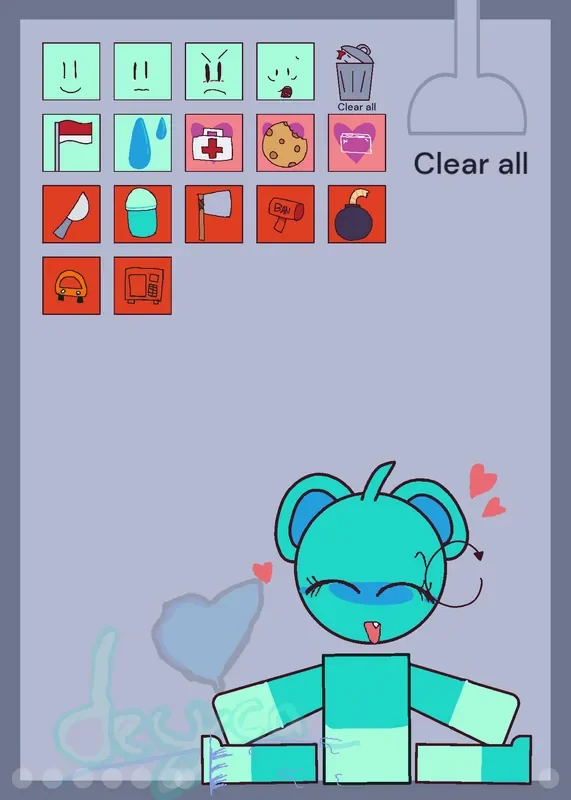
Toolbox Mechanics and Interaction Rules
The primary interface element is an icon grid situated in the upper-left corner of the display. Selecting an item from this grid spawns it inside or near the right side of the play area, where it can fall under gravity, bounce, or be dragged directly into Sky. The options range from harmless items to destructive tools, each altering the scene through visual changes or physical impact:
- Non-lethal props: Water, a medical kit, a cookie, and a flag trigger mild or character-specific responses. Water temporarily changes the visual appearance of contacted body parts, while the cookie and medical kit activate dedicated reaction frames.
- Impact weapons: A knife, hammer, destructive sign, and bomb represent the aggressive tier. These objects require thrown velocity or direct speed to produce convincing collisions; merely resting a blade against Sky's torso produces little effect compared to throwing it across the room.
- Expression adjustments: Face icons allow direct manual changing of Sky's head graphics to display different reactions regardless of current physical contact.
| Action | Input | Result |
|---|---|---|
| Select a prop | Click or tap a toolbox icon | Spawns selected object or triggers its effect near the right side |
| Move Sky | Click or press and drag a body part | Pulls connected ragdoll limb through the room |
| Move a spawned object | Click or press and drag the object | Repositions item to collide with or impact Sky |
| Change Sky's expression | Select a face icon | Switches head graphic to a specific reaction frame |
| Clear spawned items | Select Clear all | Removes active objects without reloading the room |
| Restore initial scene | Select circular-arrow control | Resets Sky and the room to their starting state |
Visual Clarity, Control Design, and Interface Friction
While Sky's bold turquoise coloring and readable eye shapes keep the central ragdoll distinct against the muted background, the surrounding user interface introduces minor friction. The toolbox relies entirely on small, unlabelled pictures, making several items difficult to identify until selected. Furthermore, the oversized Clear all button occupies substantial screen real estate, competing with Sky and spawned props for space on the narrow vertical canvas.
Two reset options allow players to manage clutter during testing. Selecting Clear all sweeps away active knives, bombs, and props without forcing a full page refresh, preserving Sky's current physical position. Conversely, the circular-arrow control resets both the ragdoll and the environment back to their original standing positions. For players browsing physics sandboxes on Fortcade, these instant reset controls ensure experiments can be iterated quickly without technical interruptions.
Player feedback around the character's presentation highlights how closely fans follow Sky's visual details. Community discussions noted temporary confusion during a past visual update that added a fur texture to Sky, leading to developer adjustments to restore the expected hand-drawn finish. Players have also engaged in ongoing discussions regarding Sky's character details and identity, showing that even a simple sandbox toy benefits from recognizable character context.
Audio Feedback and Structural Limitations
Audio design reinforces physical contact through tailored sound effects connected to dragging actions, object bounces, and prop triggers. These audio cues provide immediate confirmation when an item hits Sky with sufficient force, separating a direct hit from an object that merely glides past into the corner. Background music and novelty sound elements complement the visual feedback, though the primary focus remains on ragdoll physics and graphic reactions.
The ultimate limitation of this edition is its structural scope. Everything takes place within a single room featuring one character model and one compact tool selection. There are no unlockable weapons, secondary stages, achievement checklists, or scoring multipliers to extend play time. Once a player has thrown every weapon, tested each expression frame, and observed how the gentle props interact with Sky, the remaining novelty rests entirely on rearranging the ragdoll's limbs.
Sprunki Kick the Buddy: Sky Edition provides a brief, expressive physics demonstration. Its fluid ragdoll movement and character-specific reactions offer immediate amusement, but its single-room setup and limited tool count make it a short distraction rather than a deep sandbox game.