Dropping a cartoon ragdoll into a vertical test chamber bordered by spinning spiked wheels immediately sets the tone for Sprunki Wenda & Gray Ragdoll Playground. Created by @Smug_Wenda, this browser title operates as a compact physics sandbox rather than a goal-driven action game. There are no levels to finish, scores to protect, or combat systems to master. Instead, the focus rests entirely on manipulating two distinct characters—Wenda and Gray—using a row of interactive props, observing how collisions alter their multi-jointed bodies, and resetting the room whenever an experiment runs its course.
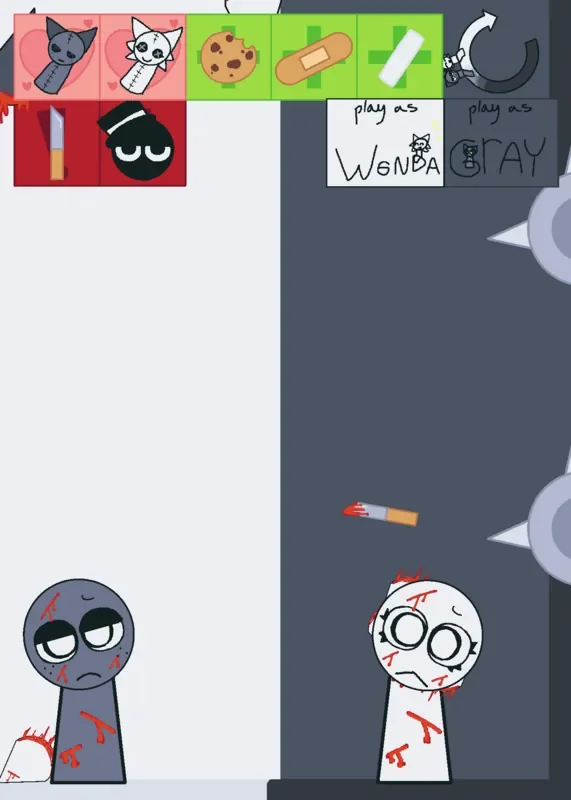
The sandbox provides three distinct setup modes: Wenda alone in a bright white experimental space, Gray alone in a charcoal-colored room, and a split-screen Both mode that divides the display vertically down the middle. In this combined layout, Wenda stands on the white left side while Gray occupies the dark right side. Their contrasting facial expressions establish much of the game's personality; Wenda looks wide-eyed and cheerful, whereas Gray maintains an unimpressed, half-lidded stare even as the surrounding environment grows chaotic. Because each character is built from multiple connected pieces rather than behaving like a single rigid sprite, pulling one section changes the figure's posture and drags the rest of the body along in loose, awkward ragdoll fashion. Navigating between scenes relies on handwritten UI controls labeled play as Wenda, play as Gray, and play as Both. While functional, these buttons are small, possess clickable areas that do not always match their visual rectangular bounds, and separate the dual-character option from the main pair.
 3 Game Screenshots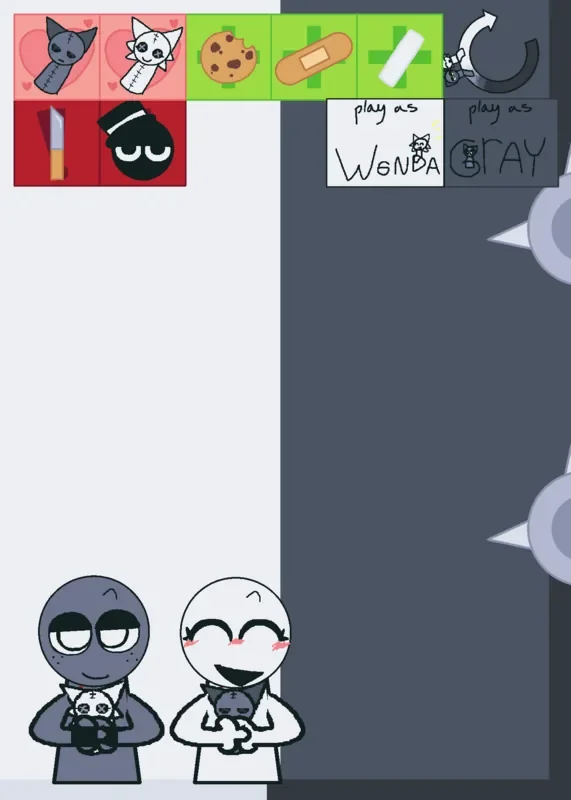
Props, Collisions, and Character Reactions
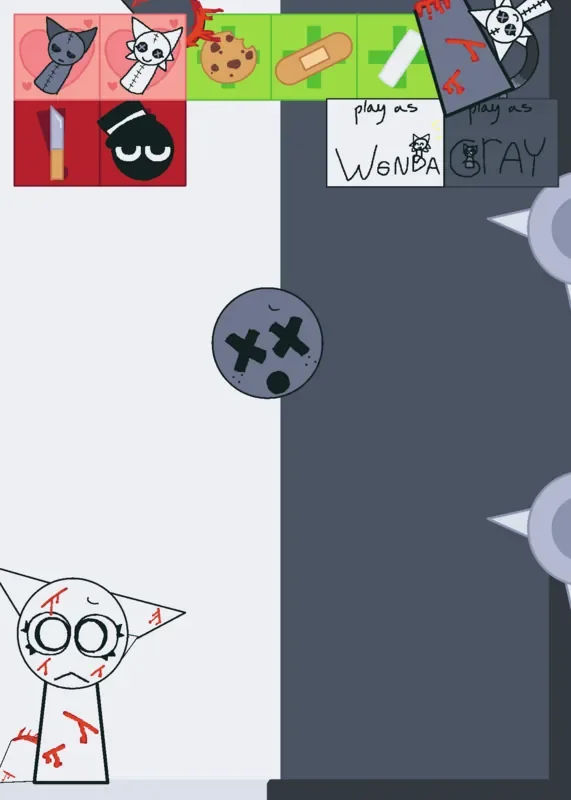
Experiments begin by tapping hand-drawn icons along the toolbar to create specific objects within the play space. Props interact directly with tagged sections of the ragdolls, including the head, torso, and connecting limbs, triggering unique visual frames, physical adjustments, and sound effects upon contact. Spawning a cookie and bringing it to a character's mouth steadily advances their head through several expressions while increasing their body mass and weight across repeated feeds. The chalk prop induces another exaggerated physical reaction affecting head size and proportions, while bandages alter the visual texture of whichever specific body part they touch. For sharper impacts, the blade prop applies injured visual frames to the head, torso, or limbs, and the Black icon functions as an instant facial expression trigger that alters Wenda and Gray's faces without serving as an independent playable character.
In Both mode, the toolbar expands to supply separate light and dark character plushes, allowing players to direct visual gags to either side of the split screen independently. Environmental hazards, such as the large spiked wheels protruding along the right side of the chamber, respond whenever struck by a ragdoll part, providing collision feedback without imposing health bars or game-over penalties. If a character becomes pinned, distorted, or scattered into an inconvenient position, tapping the circular-arrow reset button instantly restores the active room to its default arrangement.
| Action | Input | Result |
|---|---|---|
| Move a ragdoll | Press and drag the character | Pulls the figure through the physics space |
| Create a prop | Tap a toolbar icon | Spawns a cookie, bandage, chalk, blade, plush, or effect |
| Apply a prop | Contact a body part | Triggers a sound effect, frame change, or physical adjustment |
| Change layout | Tap play as Wenda, play as Gray, or play as Both | Opens the selected sandbox arrangement |
| Reset the room | Tap the circular arrow | Restarts the current scene and restores its default layout |
Presentation, Player Experiments, and Technical Limitations
Visually, the presentation resembles an animated fan-art sketchbook, built with uneven hand-drawn lines, handwritten labels, and overlapping menu elements that sit close to the play area. Audio effects give physical impacts clear purpose, assigning distinct sounds to eating, cosmetic adjustments, blade contact, plush reactions, and hazard collisions. Players frequently identify the background soundtrack as "The End of the Universe" from Little Runmo, which loops continuously behind the physical chaos. Within this open environment, common player experiments often focus on removing character hair frames to create bald designs or overfeeding ragdolls to push their physical proportions to extreme sizes.
Despite its expressive character frames, the playground is structurally brief. All three layouts share the same small toolbox and physics rules, without any built-in challenges requiring players to reach a target, reproduce a pose, or survive for a set duration. The absence of an opening tutorial also means that the distinction between consumable items, appearance effects, and navigation toggles must be learned through direct trial. Players also note technical frictions during high-intensity testing, reporting performance lag or app crashes when spawning excessive props into the scene. Audio glitches can also occur, such as the background music silencing completely after resetting a room or collision sound effects becoming uncomfortably loud during crowded setups. On platforms like Fortcade, the title serves as a straightforward visual toy box—ideal for brief testing sessions, comparing Gray and Wenda's facial frames, and clearing the room before physical clutter disrupts performance.
Sprunki Wenda & Gray Ragdoll Playground provides an accessible, penalty-free sandbox for players who enjoy reaction animations and physical ragdoll toys. While it lacks narrative lore, combat systems, or long-term progression goals, its split-screen arrangement and responsive character joints deliver a lighthearted environment for quick physical testing.

![AY in Noggin's RL, GL Game Redux [ 40 Players ] game cover](https://fortcade.com/wp-content/uploads/2026/10/ay-in-noggin-s-rl-gl-game-redux-40-players-225x300.webp)