What begins as a simple virtual-pet setup quickly transforms into a surprisingly vast, multi-room platforming network. While listed under the working title Life or Bath for Sprunki Simon, creator @patch2555's project is better understood by its actual in-game title, Take Care of Sprunki Simon. Bathing forms only one part of a broader care simulator that spans feeding, sleeping, character interactions, and an unexpectedly large side-scrolling outdoor adventure.
 3 Game Screenshots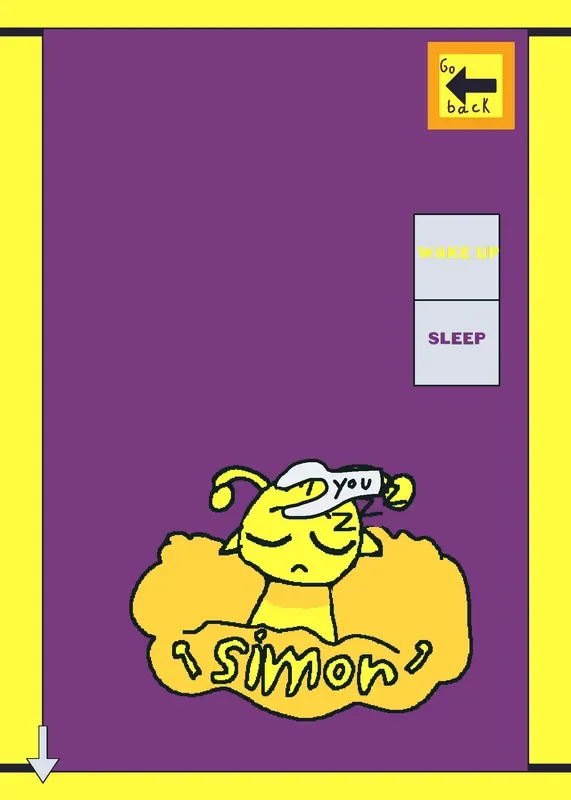
Four Care Routines from a Homemade Hub
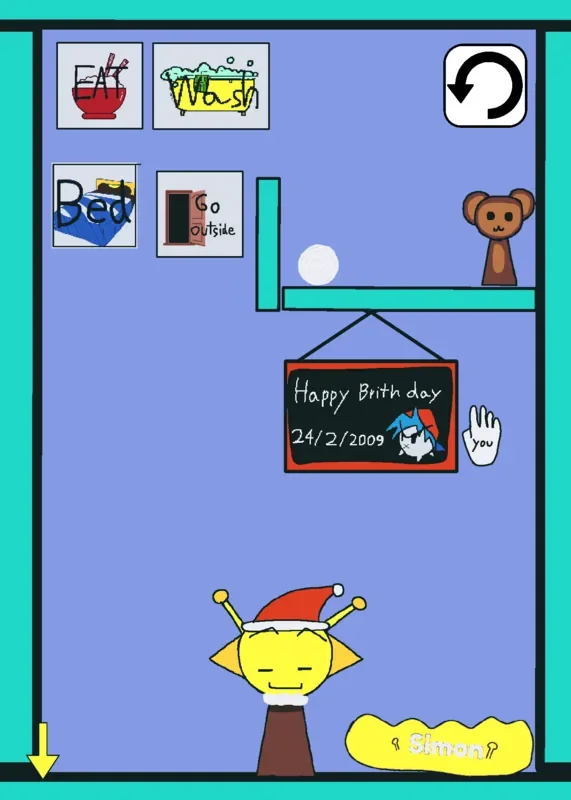
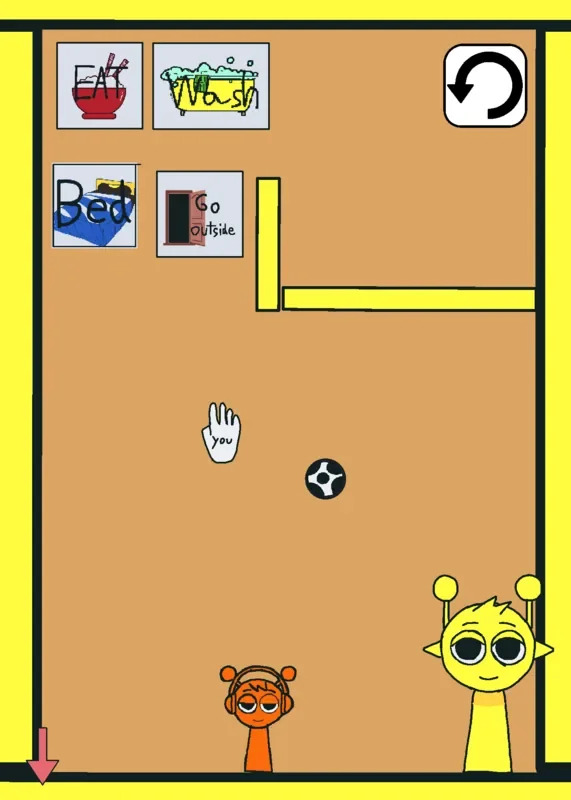
The game opens in a hand-drawn care center that serves as the central hub. Simon, a character featuring a yellow body and prominent antennae, stands at the bottom of the screen below a shelf holding a small animal, a ball, and a prominent restart button. Bright yellow borders, flat-color backgrounds, handwritten labels, and thick black outlines give the interface a toy-box appearance. The main menu is split into four hand-drawn activity icons rather than conventional buttons:
- Feeding: Drops the player into a dining scene stocked with boiled eggs, cola, chopsticks, and several food portions. Local Thai players frequently recognize specific food items like instant noodles (Mama) as familiar cultural touches. Moving food into collision with Simon triggers facial frame shifts, short sound effects, and the disappearance of the eaten item. The room lacks cooking recipes or nutrition meters, focusing instead on collision-based reactions and direct manipulation.
- Bathing: Represents the scene closest to the working title. Simon stands beside a large bathtub equipped with a shower head, soap, a dragable towel, and a water button. Touching Simon with bath objects alters his emotional state, generating tears or temporary expressive frames. A back button exits to the main hub, while a circular-arrow reset button restores misplaced items.
- Sleeping: Features a bed, a sleeping banana cat, a Banana Doll, floating sleep symbols, and explicit Sleep and Wake Up toggles. Tapping room objects shifts animation frames between resting and awake states, substituting physical interaction for standard energy meters.
- Going Outside: Marks the most dramatic shift in structure. Tapping this option exits the stationary care center and enters a side-scrolling platform section complete with virtual movement controls, a jump button, environmental hazards, a hammer, doors, audio shifts, and camera tracking. Reaching the end leads through a short cutscene into a secondary hub that branches into additional feeding, bedroom, and exploration areas.
Direct Touch Controls and Gesture Friction
Interactions rely on direct touch or mouse inputs, marked on screen by a custom hand cursor. While the basic tap-and-drag mechanics allow for easy experimentation, the game provides almost no onboarding, leading to occasional control confusion. Certain objects must be dragged across the screen, others react to a quick tap, and a few require direct collision with a specific character frame before anything happens.
| Action | Input | Result |
|---|---|---|
| Choose an activity | Tap a hub icon | Opens feeding, washing, sleeping, or outdoor play |
| Interact with Simon | Tap Simon | Triggers a temporary expression and sound |
| Use care items | Tap or drag an object | Moves the item or applies its effect on contact |
| Explore outside | Use virtual movement controls | Moves the playable character through scrolling areas |
| Jump | Press the on-screen jump button | Clears obstacles or reaches raised platforms |
| Return to hub | Tap the visible back button | Exits the current activity scene |
| Reset room | Tap the circular restart button | Restores scene objects to default positions |
Because gestures are not explicitly labeled, inactive objects can appear broken when a player simply uses the wrong input method. Player observations also note minor physics bugs during room routines, such as items vanishing unexpectedly or sleeping characters levitating mid-air. When objects get stuck or float out of reach, tapping the circular restart button remains the primary fix.
Visual Style, Audio, and Fragmented Progression
Simon’s bright yellow body stands out clearly against the brown hub, blue-purple bathroom, and flat-colored room backgrounds. Emotional feedback relies heavily on changing facial frames—squinting eyes, open mouths, and tear effects carry the character's reactions. Audio design layers looping background tunes over short synthesized noises and recorded sound clips for eating, tapping, moving, and scene transitions.
Despite these cohesive artistic choices, the connection between the care simulator and the platforming adventure remains loose. The scrolling outdoor levels introduce unfamiliar characters and visual elements without introduction, and the game does not explain how navigating platform hazards affects Simon's overall wellbeing. On Fortcade, this expansive network gives players plenty of unmarked interactions to test, even if the jump from cozy care routines to side-scrolling action feels abrupt. Community discussions often focus on sharing guides for discovering these hidden branch pathways and secret scene variations.
Evaluating the Care and Exploration Loop
Without an explicit task list, timers, or formal victory screen in the care rooms, progression relies entirely on self-directed trial and error. Players reset scenes, experiment with object collisions, and move between rooms at their own pace. The outdoor section offers more linear directional movement through doors and collision points, but still refrains from showing explicit objective text.
For players seeking an open-ended virtual pet experience with hidden branching scenes, the game provides surprising depth. Those expecting structured care tasks or a seamless transition into the platforming levels may find the sudden visual and mechanical shifts disorienting. The central care rooms offer the most coherent gameplay, while the outdoor adventure supplies unexpected scale alongside most of the game's rough edges.