Two Sprunki-inspired infants, Oren and Pinki, sit inside a cardboard box in tears before the player even presses a button. Selecting the hand-drawn "Yes" prompt transitions the scene into a house overflowing with physical props, roaming pets, and interactive guest figures. Operating without score counters, health bars, countdown timers, or fail conditions, Take Care Of Baby Oren And Pinki functions as an open-ended interactive sandbox centered around dragging items, organizing routines, and triggering physics-based reactions across four connected spaces.
Created by -_deeka_- as a remix of an original deck by timmy2526verity, the web edition faithfully preserves the opening artwork and core room structures of its Castle deck origin. Rather than forcing players along a rigid narrative path or demanding strict time management, the simulation invites unscripted experimentation. Objects clatter together upon contact, character faces shift during drops, and caregiving tasks like feeding and bathing exist alongside unconstrained physical play.
 3 Game Screenshots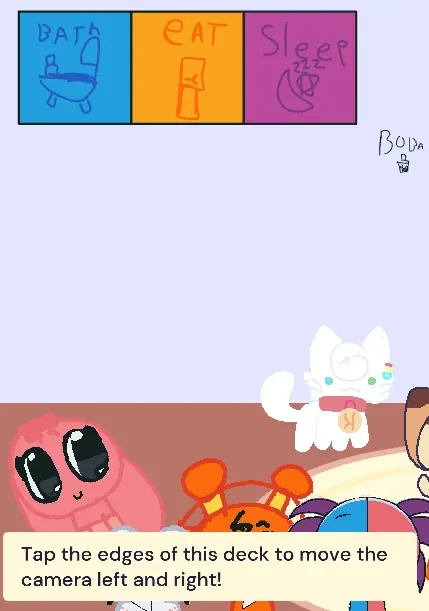
Home Hub Navigation and Physical Collision Rules
Home serves as the main hub connecting every area of the experience, but its horizontal room boundaries stretch past the standard visible monitor width. To view the full living room, players must press or hold near the left and right edges of the screen to move the camera back and forth. An opening message explains this camera control, though the instructional banner repeatedly covers the lower section of the viewport for several seconds upon loading, temporarily hiding interactive objects resting near the floor.
Once the camera pans across the space, the house reveals an extensive selection of scenery props and guest characters. Beyond Oren and Pinki, the hub houses miniature Oren lookalikes, Binky loaf creatures, Lily variants, kittens, a rabbit, sofas, lamps, wool strands, floor gaps, and solid walls. Many of these elements feature specialized collision rules. Dropping a kitten onto a sofa produces a distinct response compared to throwing it against a wall, dragging it near wool, or colliding it with another feline. The rabbit uses a similar set of collision behaviors, while tapping other guest figures causes their expressions to change or prompts Binky loaf creatures to produce their own touch response.
While this packed layout creates entertaining slapstick moments when objects bump into one another, it also introduces mechanical friction. The busy floor plan leads to heavy visual overlapping, causing smaller figures to fall into piles near the room edges or get buried beneath larger props. Selecting a specific resident becomes difficult when characters stack together, making precise dragging harder than it needs to be.
Interactive Feeding Sequences in the Eat Room
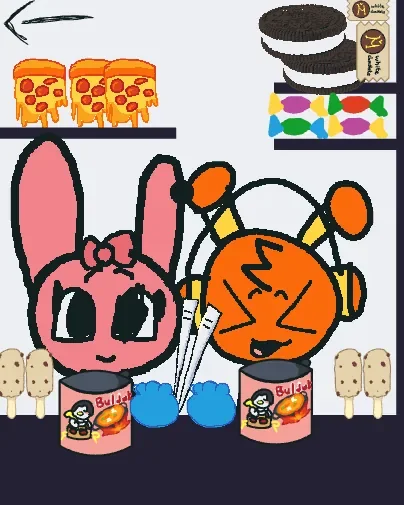
Moving into the Eat room unlocks the most mechanically developed activity in the game. The kitchen features an eccentric assortment of food items and dining utensils, including steak, rice balls, candy, cheese ramen, chopsticks, and a small mechanical creature that moves across the floor as a background distraction. Dragging food directly onto Oren or Pinki triggers character reactions, advances feeding animations, plays audio cues, tracks successful consumption internally, and removes or replaces the consumed item.
Several items offer multi-step interactions that reward hands-on discovery. Tapping the bowl of cheese ramen advances its consumption state, while chopsticks can interact with the noodles before being used to feed either baby. Candy shifts its visual form upon contact, generating a playful collision reaction rather than disappearing immediately. Steak and rice balls act as direct food sources, satisfying the babies upon touch. Because the room includes no explicit instructions, players must discover these specific item combinations through experimentation, though a brief prompt like dragging food toward the babies would clarify the objective.
Bath Routines and Character Visual States
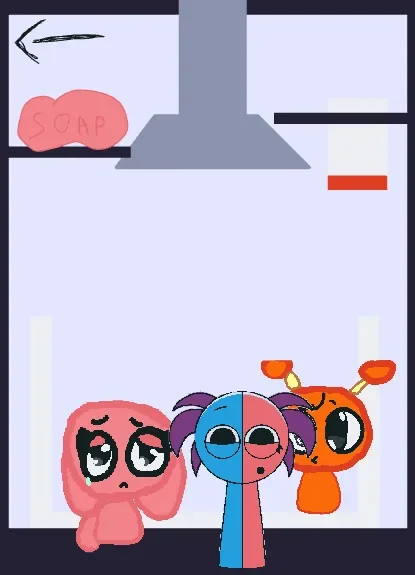
The Bath scene provides the clearest realization of the game's caregiving title. Structured around a shower area, soap, water droplets, and a drying towel, the room establishes a logical four-step cleaning routine. Pressing the shower area spawns water and soap objects inside the room. Bringing these items into direct contact with Oren or Pinki changes their visual state to show a soapy or wet appearance. Water and soap objects disappear upon reaching a baby, preventing the environment from filling indefinitely with spawned props.
To complete the bath routine, players drag the towel across either baby to remove the suds and return their sprites to a clean, dry state. This straightforward cause-and-effect loop makes Bath the most focused space in the game, delivering a complete routine where player actions lead to predictable visual results.
Unfinished Features, Interface Hitboxes, and Navigation
Despite the clear activity loops in Eat and Bath, the game displays noticeable structural gaps. The main menu visibly displays icons for Bath, Eat, and Sleep, yet selecting Sleep displays a "Coming soon" notification rather than loading a bedroom. This missing scene leaves the daily routine unfinished, cutting off what would otherwise be a natural feed, bathe, and bedtime cycle.
Room navigation also presents handling issues. Although the hand-drawn menu icons are visually clear, their active hit areas are less reliable than the physical size of the buttons suggests. Entering the main house from the start screen functions correctly, but selecting secondary care rooms from the hub requires precise clicking. Each individual activity includes a return button back to Home, but larger, clearer touch targets would noticeably smooth the transition between rooms.
The visual presentation relies on a sketchbook aesthetic defined by thick black outlines, uneven text, simple color blocks, and exaggerated expressions. Oren's orange design and Pinki's pink palette ensure the primary babies remain recognizable even when guest figures crowd the home hub. Available on web game catalogs like Fortcade, the experience delivers a compelling assortment of character interactions and physics reactions for players who prefer open sandbox discovery over rigid scoring metrics.
Control Mapping
| Action | Result |
|---|---|
| Tap “Yes” | Enter the house from the opening screen |
| Hold or tap screen edges | Move the Home camera left or right |
| Tap a character | Trigger an expression or sound reaction |
| Drag pets and characters | Move them around and trigger collisions |
| Drag food to a baby | Feed Oren or Pinki in the Eat room |
| Press the shower | Spawn water and soap objects |
| Drag towel over a baby | Dry and reset a baby’s visual state |
| Select Bath or Eat | Switch to the corresponding activity room |
While incomplete bedtime content, tight menu hitboxes, and crowded visual layouts highlight its prototype status, the sandbox balances these limitations with varied item behaviors and responsive character states. Expanding button target areas and finishing the Sleep room would transform this caregiving experiment into a fully rounded virtual pet title.